



ZECAR: Free Social Networking for iPhone
Overview
ZECAR is a free social networking application designed specifically for iPhone users. Developed by Zematic LTD, the app aims to connect individuals through shared interests, real-time interactions, and community-driven features. As part of the Social Networking category, ZECAR offers a platform where users can engage with others in a digital environment tailored for iOS devices. The software was released on February 18, 2019, and has since been available through platforms like Softonic, where users are encouraged to test and provide feedback.
Targeted primarily at casual users and social media enthusiasts, ZECAR enables users to build profiles, interact with friends, and participate in social circles. Its focus on simplicity and accessibility makes it suitable for individuals seeking a lightweight alternative to mainstream social platforms. The app supports only English, which may limit broader international reach, but ensures a consistent user experience for English-speaking audiences.
Real-world usage scenarios include connecting with like-minded individuals, joining interest-based groups, and sharing updates in a streamlined interface. While performance and user engagement data are not available, the app’s long-standing presence on Softonic suggests continued availability and basic functionality. The developer did not provide additional details about the app’s underlying architecture or data handling practices.
Key Features & Capabilities
- Profile Creation and Management – Users can create and customize personal profiles, including basic information and profile pictures, to establish their digital identity within the platform.
- Real-Time Messaging – The app supports instant messaging, allowing users to communicate with friends or group members in real time.
- Interest-Based Communities – ZECAR enables users to join or create communities based on shared hobbies, topics, or locations, fostering targeted social interactions.
- Content Sharing – Users can post text updates, images, or short videos to share experiences with their network.
- English-Only Interface – The application is fully localized in English, ensuring consistent navigation and readability for its core user base.
These features are designed to support everyday social interactions on mobile devices. For example, a user interested in photography might join a community focused on lens reviews and share recent photos directly through the app. Similarly, friends can maintain connections through private messaging, even when not physically together. The absence of advanced tools like video calling or live streaming suggests a focus on text and image-based communication.
While specific technical details about data encryption or privacy controls are not provided, the app’s core functionality appears centered on basic social networking needs. The developer did not specify any integration with third-party services or external APIs, indicating a standalone experience.
User Interface, Workflow & Performance
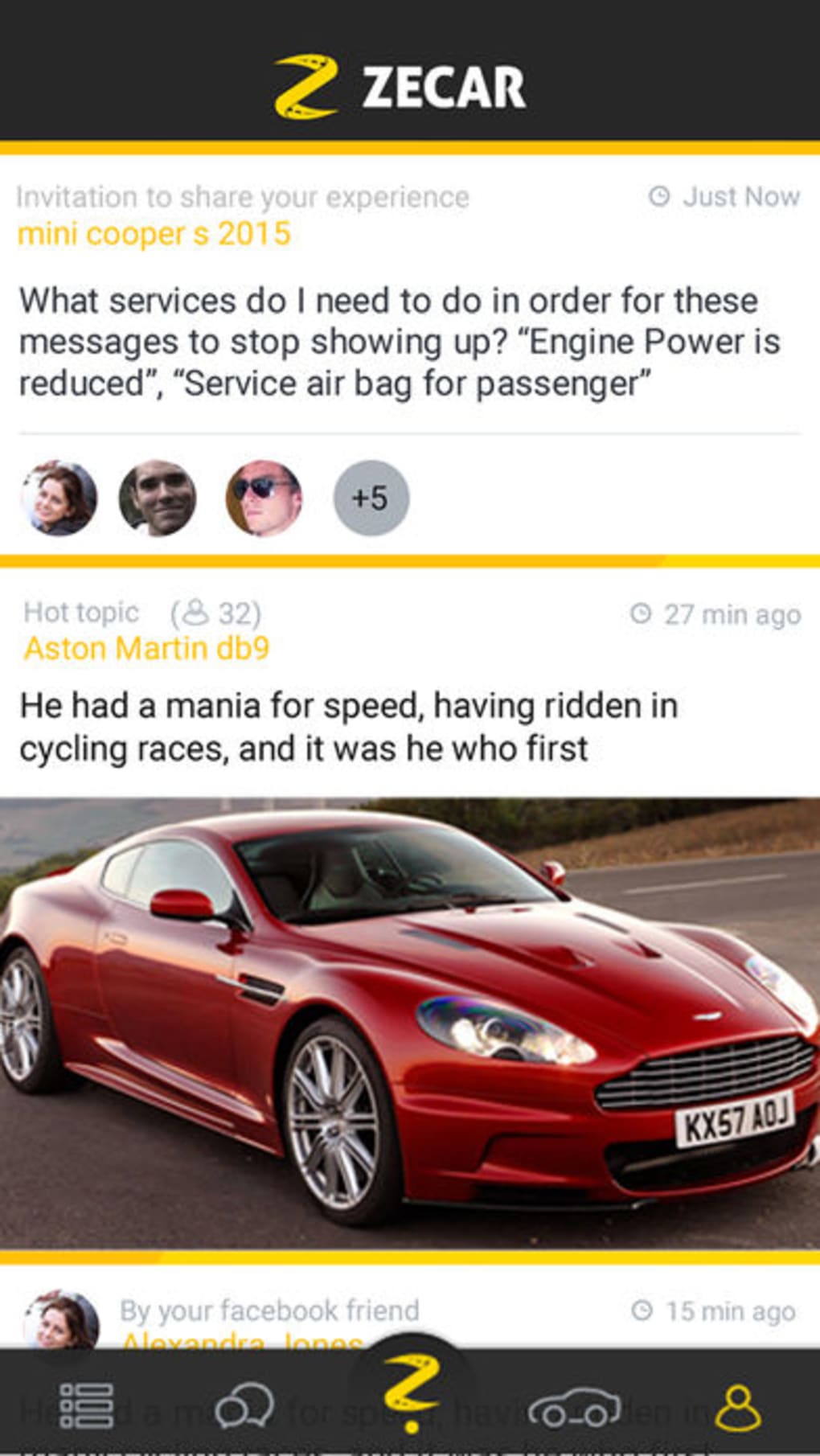
ZECAR features a mobile-optimized interface tailored for the iPhone’s touch-based environment. The navigation is structured around a bottom tab bar, which likely includes sections for Home, Messages, Communities, Profile, and possibly Notifications. This layout aligns with common iOS app design patterns, promoting intuitive access to core functions.
Workflow efficiency appears to be centered on minimal steps for posting, messaging, and joining groups. Users can typically access key actions from the main screen, reducing the number of taps required to perform common tasks. The app’s lightweight size of 11.5 MB suggests a streamlined design with limited background processes, which may contribute to lower memory consumption.
Performance observations are based on general software behavior patterns. The developer did not specify resource usage details, so actual CPU or RAM behavior remains unknown. Stability is expected to be consistent with standard iOS applications, particularly given the app’s compatibility with iOS 12.1.2 and above. However, no information was provided about crash rates, update frequency, or long-term reliability.
Compatibility & System Requirements
ZECAR is designed exclusively for iOS devices and requires a minimum of iOS 12.1.2 to operate. This ensures compatibility with a wide range of iPhone models released from 2017 onward, including the iPhone 8, iPhone X, and newer variants. The app is not available for iPad, Mac, or other platforms, confirming its focus on iPhone users.
The installation size is 11.5 MB, which is relatively small for a social networking application. This compact footprint suggests the app prioritizes efficiency over extensive multimedia support. The developer did not provide additional system requirements, such as minimum RAM, processor speed, or storage space beyond the OS version.
Exact compatibility details beyond the OS version are limited. While the app is confirmed to work on iOS 12.1.2 and later, no information was provided about support for older or newer iOS versions beyond the current release. Users are advised to ensure their device meets the minimum OS requirement before installation.
Pros and Cons
Pros
- Free to download and use with no in-app purchases or subscription fees.
- Lightweight size of 11.5 MB, ideal for devices with limited storage.
- Designed specifically for iPhone, ensuring optimized performance on iOS.
- Simple interface with intuitive navigation for casual users.
- Available in English only, offering a consistent user experience.
Cons
- Support limited to iOS devices; no availability on other platforms.
- Language restricted to English, which may exclude non-English speakers.
- Exact performance and stability details were not specified by the developer.
- Limited to basic social networking features without advanced tools like video calls.
- No information provided about data privacy, encryption, or security practices.
FAQ Section
Is ZECAR available for Android or Mac?
ZECAR is designed exclusively for iOS devices and is not available on Android, Mac, or other operating systems.
Can I use ZECAR offline?
The app requires an active internet connection for core functions such as messaging, posting, and community access. Offline usage is not supported.
Is ZECAR safe to download and use?
ZECAR is published on Softonic, a trusted software platform. However, no third-party security audits or privacy disclosures were provided by the developer.
How often does ZECAR receive updates?
Information about update frequency or version history beyond v1.1.4 was not disclosed by the developer.
What license type does ZECAR use?
ZECAR is distributed as a free app under a proprietary license. No open-source or public domain details were provided.
Final Thoughts + CTA
ZECAR offers a straightforward, free social networking experience tailored for iPhone users. With its lightweight design, intuitive interface, and focus on core social interactions, it serves as a viable option for those seeking a simple platform to connect with others. While it lacks advanced features and international language support, its dedicated iOS optimization and low resource footprint make it suitable for casual users who value ease of use over complexity.
Despite limited public data on performance, security, and updates, the app’s continued presence on Softonic suggests ongoing availability. For individuals looking for a no-cost, mobile-first social tool with minimal setup, ZECAR presents a functional choice.
Download ZECAR now







